Migrate from Mailchimp
Contacts, templates, automations and suppression lists move in a fixed order, with the sending domain authenticated before DNS is switched.
48 hours typical
Suppression first. DNS last. Keep the old platform read-only for 72 hours.
Inventory
Export contacts, tags, segments, templates, automations, suppression lists and custom fields. Record the current sending domain and DNS records.
Import
Import with consent state and unsubscribe flags. Map custom fields. Never import without suppression — that is the most common deliverability mistake.
Rebuild
Rebuild the two highest-volume automations. Keep the rest in a backlog; do not rebuild everything before cutover.
Cutover
Authenticate the sending domain, warm the IP, seed-test, then switch DNS. Keep Mailchimp read-only for 72 hours.

The short version
- Mailchimp is a mature email product with a real editor and a large template library, so the thing you will miss is not the sending engine. It is the accumulated small decisions inside tags, groups, segments and automations.
- Tags, groups and segments look interchangeable in the interface and behave differently in an export. Sorting them into those three buckets before you import prevents most of the field-mapping work from becoming manual.
- Suppression goes in first. Every unsubscribe, hard bounce, complaint and erasure request has to be applied before the first campaign from the new platform, not after it.
- Rebuild the two automations that carry the most mail and put the rest in a dated backlog. Rebuilding the whole automation library before cutover is the most reliable way to miss the date.
- Mailchimp bills in USD on a card for Indian teams, so the commercial half of this migration is a GST invoice and a plan sized on marketing contacts rather than raw rows.
- The sending domain needs authentication and a warm-up measured in days. A small list can be warm in a week; a large one cannot, and no amount of planning changes that.
An email-first account, audited line by line
A Mailchimp account is usually more organised than its owner remembers. Somebody built a group for webinars in 2021, somebody else tagged everyone who bought a specific product, and a third person created a segment for a campaign that ran once. None of it is wrong; all of it accumulates. The audit is the process of turning that sediment into a list you can defend, and it is the only part of this migration that cannot be delegated to an import tool.
Audit four layers. The audience layer is contacts and their fields. The organisation layer is tags, groups and segments. The content layer is templates, and the logic layer is automations plus the journeys and rules inside them. Add a fifth column for suppression, because the state of your unsubscribes and bounces is the part with legal and deliverability consequences. For each layer, record what exists, how many of each object, who owns it and whether it is still used.
The output should fit on one screen. If your audit needs a second page, you are cataloguing rather than deciding. The decision for each object is one of four: import, rebuild, retire, or leave in Mailchimp until the account closes. Anything without a decision becomes a task somebody discovers in week three, and by then the person who built it has changed teams.
- Count contacts, and count marketing contacts separately, because only the second number affects your bill.
- List every custom field and mark whether it is populated on more than a trivial number of records.
- List tags, groups and segments with a usage note: which campaign or automation last referenced it.
- Record the sending domain, the DNS records in use, and who controls the DNS account.
Tags, groups and segments are three different things
Tags are labels attached to a contact, and a contact can carry many. Groups are closer to subscription preferences: a contact belongs to a group, can see it in a preference centre, and can leave it. Segments are saved queries computed from conditions. The three feel similar when you are clicking around at speed, and they diverge completely when you export, because a tag is a value, a group is a relationship and a segment is a rule that has to be re-expressed against a different field set.
The practical consequence is that only tags and groups travel as data. A segment travels as a name and, at best, a list of members at the moment of export. If the segment was defined as everyone who clicked a link in a campaign two years ago, the membership you export is a snapshot with no rule attached, and it will be stale the moment somebody opens an old email. Decide per segment whether you want the snapshot as a one-off audience or the rule as a condition you rebuild.
Groups deserve special attention because they often double as consent. A group called Product Updates that a contact actively joined is a preference with a legal meaning. A tag called newsletter that your team applied in bulk is not. When you map groups into the new platform, keep the ones that represent an actual choice and demote the rest to ordinary tags, so that a preference centre in the new system shows a customer the choices they really made.
What the export can tell you, and what it never will
The export gives you rows: contacts, fields, tags, group membership and, if you ask for them, the suppression lists and template files. Record the sending domain and the current DNS records in the same sitting, because those are not in the contact export and they are the part you will need on cutover night. Do the export early in the day and keep the file somewhere with an owner, not in a downloads folder on somebody’s laptop.
What the file cannot tell you is why anything exists. It cannot say that the welcome automation was written to answer a question customers kept asking on Instagram, or that a segment exists because a wholesale buyer needed a different price list. Those reasons live in people’s heads and in old campaign threads. Capture them in the audit while the account is still active, in one sentence per object, and you will rebuild faster than any team that skipped this step.
Export in more than one pass. The first pass is a small sample so you can inspect the column names and the encoding before committing to a mapping. The second pass is the full file. The third is the suppression lists, taken separately, because they need to be applied before anything else is imported and because they often contain addresses that no longer exist in the audience. Keep all three with dates in the filename.
Custom fields, merge tags and the translation table
Every custom field in the old account was created for a reason, and about half of those reasons no longer apply. Sort them into three piles: fields used in a live template or automation, fields used for reporting, and fields nobody can explain. The first pile needs a mapping, the second needs an export to a spreadsheet before the account closes, and the third can be dropped with a note in the audit. Dropping a field is reversible; discovering in month two that a personalisation token has no source is not.
Build the mapping as a table with six columns: old field, sample value, new field, type, transformation, and what happens when the value is empty. That last column is the one that prevents the greeting that reads Hi comma. Dates need a format decision, numbers need a currency and decimal decision, and phone numbers need a country-code decision, because an Indian mobile number stored without +91 will fail a WhatsApp lookup later.
Merge tags in templates are a separate mapping from contact fields, even though they draw on the same data. A tag that renders a fallback value in one editor may render nothing in another, and a tag that loops over a product feed has no meaning without a catalogue. List every merge tag used across your templates, note its fallback text, and test it with a contact who has the field empty. That test finds more defects than any amount of proofreading.
Suppression is the first import, not the last
The most common deliverability mistake in any migration is importing contacts before importing suppression. Do that and a person who unsubscribed in 2022 receives a comeback campaign in 2026, which is both a complaint and, under DPDP, a consent problem. Suppression is not a preference. It is a set of facts about what you must not do, and it should be applied in the new platform before the first contact row lands.
Four sources feed it. Unsubscribes are explicit. Hard bounces are technical but permanent until proven otherwise. Complaints are the strongest signal you will ever receive. Erasure requests are a legal instruction that has to travel to every channel, including WhatsApp and voice, not only email. Merge them into one suppression list with a source column so that you can explain, later, why a particular address is blocked.
Two rules make the merge safe. Suppression wins over any other flag, so a record that is both subscribed and suppressed stays suppressed. And the newest instruction wins within suppression itself, so a re-subscribe after an unsubscribe is honoured only if you have a record of the re-subscribe. If you cannot show that record, treat the contact as suppressed. Being wrong in that direction costs you a few sends; being wrong in the other direction costs you a complaint and a customer.
Consent for an audience that predates DPDP
Many Indian lists were built before the DPDP Act was in force, which means the records were collected under habits rather than obligations. That does not make the list unusable. It does mean you cannot treat an imported row as fresh consent, and you cannot assume the notice a customer saw in 2019 described the purpose you are using the data for in 2026. The migration is the moment to separate what you can prove from what you merely believe.
The consent ledger does the proving. One entry per contact, carrying the purpose, the channel, the notice version, the timestamp and the collection point. Contacts with a clean record import as subscribed. Contacts with no record import as suppressed until they are re-permissioned through a proper notice. Contacts with a record for a different purpose import as subscribed to that purpose only, which in practice means they receive service mail and not campaigns until they opt in again.
Re-permissioning is a campaign with legal weight, so run it as one. Send to suppressed-by-default contacts only where you have a defensible basis to contact them for the purpose of asking, keep it to a single message, make the yes and the no equally easy, and record both answers. Do not add people who ignore the message to a campaign list and call the silence consent, because silence is the one thing DPDP does not accept as agreement. The contact records themselves sit in AWS Mumbai in ap-south-1, which is the sentence your DPO will want to see in the privacy notice rather than a paragraph about global infrastructure.
Which automations deserve a rebuild
Automations are where a migration quietly doubles in size. A mature account can hold a dozen journeys, each with branches, delays and messages that reference templates you also have to port. Rebuilding all of them before cutover is not diligence; it is a way to spend six weeks and still miss the date. The migration notes we work from are blunt about it: rebuild the two highest-volume automations and keep the rest in a backlog.
Volume is the first criterion, risk the second. An automation that sends to every new subscriber is high volume and high visibility, so it goes first. An abandoned-cart sequence is high revenue and high fragility, so it goes alongside. A birthday message that sends to a few hundred people a month can wait, and a winback journey that nobody has measured in a year is a candidate for retirement rather than a rebuild. Judge each one on messages sent and revenue attributed, not on how clever it was to build.
Then price the backlog honestly. A simple welcome with two messages and one branch is around two working days including template QA. A cart flow with a wait, an email and a second nudge is similar. A multi-step winback with three branches is closer to three days by the time every path is seeded and approved. Add review time, because every rebuilt message needs a human yes, and that human is usually the same person answering customer email.
The template you are leaving behind
Mailchimp’s editor and template library are genuinely good, and our own comparison says so: a mature drag-and-drop editor and a very large global template library are the reasons teams stay. What you are moving into is a different editor, and the port will preserve content far better than it preserves layout habits. Expect to rebuild the two or three templates that carry most of your sending rather than porting every variation, and expect the rebuilt version to look slightly different even when the content is identical.
Start from the content, not the design. Strip a template down to its message, its links and its data dependencies, then rebuild those in the new editor and add styling afterwards. Teams that begin by copying the visual layout spend a day chasing a column that will never line up the same way in Outlook. Teams that begin with the plain text version and the link list finish in an afternoon with something that renders predictably.
Test the parts that fail silently. The unsubscribe link, the preference centre link, the sender identity in the footer, the plain-text alternative, and every image hosted on a domain you are about to stop using. Images are the classic post-migration breakage: the template is fine, the file lives in the old platform’s asset library, and one day the account closes and every email in every inbox loses its header.
Domain authentication when you were one of many senders
If you have been sending through Mailchimp’s own infrastructure, your reputation was partly theirs and partly shared with every other sender on the same pool. That reputation does not come with you, and it was never fully yours to begin with. The move is the moment to take control of a sending subdomain, publish SPF and DKIM, and add a DMARC record so that mailbox providers can tell your legitimate mail from somebody impersonating you.
Do this on a subdomain rather than the root. Mail sent from a dedicated subdomain keeps transactional mail from your application on a separate reputation from marketing campaigns, so a bad campaign week does not damage password resets. It also makes the rollback cleaner, because changing one record back does not touch the rest of your DNS. The exact records come from the workspace and from your DNS provider’s documentation, not from a guide written months ago.
Then verify rather than assume. Send a message to a seed inbox you control, open the headers, and confirm that DKIM passes and that SPF aligns with the domain the recipient sees. A record that exists but does not align is worse than no record at all, because it looks configured while failing the check that matters. Do this before warm-up, not during it, or you will spend the first week diagnosing authentication instead of deliverability.
Adding a second channel mid-migration
Email-first teams often use the migration as the moment to add WhatsApp, and the temptation is to switch both channels on at once. Resist it for a week. Each channel has its own compliance surface, and debugging an email deliverability problem while also waiting for WhatsApp template approval means you cannot tell which change caused which result. Finish the email move, then add the channel with its own small, reversible rollout.
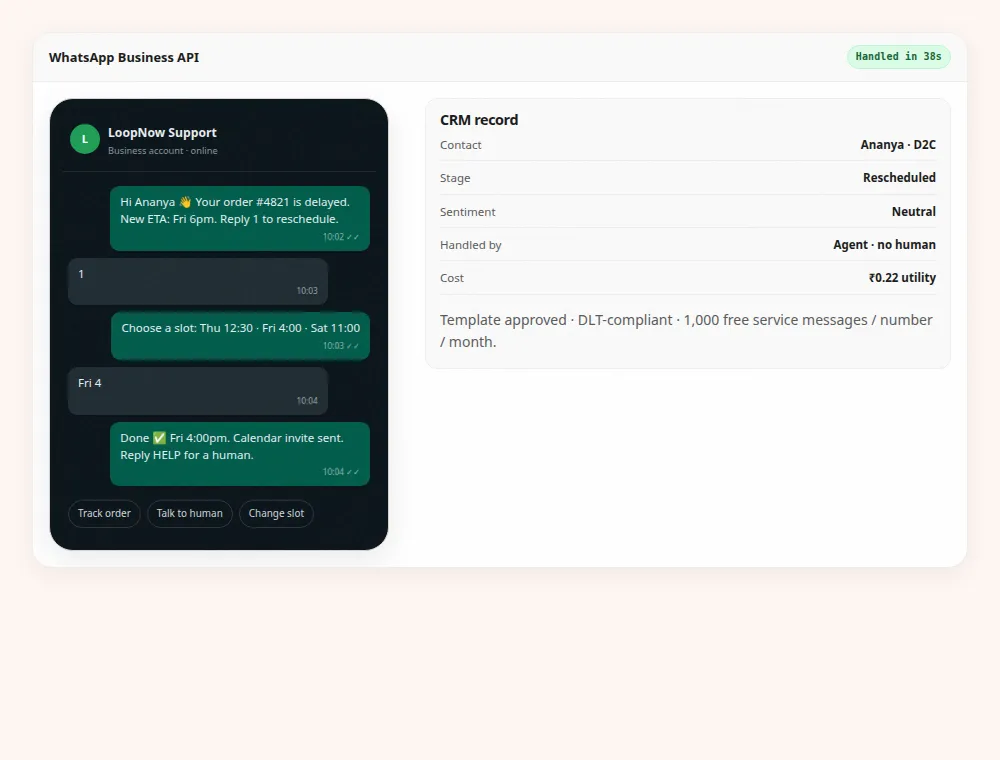
WhatsApp has a specific constraint: every template has to be approved before it can be sent, and a template approved on one business account does not automatically exist on another. Categories matter too, because a marketing template and a utility template are priced and governed differently in the published rates. Budget days rather than hours for approval, keep the old templates visible for reference, and test with a small seed list before any customer sees the new sender name.
If SMS is part of the plan, the Indian registration layer comes first. Commercial SMS requires registration on the DLT platform, with a registered header and pre-approved templates tied to a consent purpose. That is a filing exercise with its own lead time and its own rejection reasons, and no amount of product configuration compensates for a template that was never approved. Verify the current process and fees in the operator’s portal before committing to a date, because those details change.
Seven days, two checkpoints and one honest buffer
Seven working days is enough for a list under fifty thousand contacts with a handful of automations, provided the audit is finished before the clock starts. Day one is export and counting. Day two is field mapping and the suppression merge, which is usually the slowest day because it involves reconciling numbers. Day three is templates and the first automation. Day four is the second automation, seed tests and the DNS records. Day five is warm-up and a parallel run on a small slice. Day six is a buffer, and day seven is switch day.
The buffer is not padding. It is the day where the thing you did not anticipate gets fixed without moving the date: a DNS record that a hosting provider will not let you publish, a template that renders badly in Outlook, a stakeholder who wants one more read. Teams that schedule seven days of work into seven days of calendar discover that the first unexpected problem forces a choice between quality and the date, and they usually choose the date.
Two checkpoints decide whether you proceed. The first is a reconciled count: contacts exported, contacts imported, suppression applied, and a written explanation for every difference. The second is a seed test that proves the rebuilt automation sends the right message, with the right personalisation, to the right person, and that the unsubscribe link works. If either checkpoint is unclear, the cutover moves. A migration that goes live on a date nobody can verify is not on time; it is unmeasured.
Switch day, rollback and the read-only week
Switch day is short if the week before it was honest. Pause the old automations, enable the rebuilt ones, point the sending records, and send one campaign to the most engaged segment so you can watch delivery in real time. Do not schedule a full-list campaign for the same day. The point of switch day is to verify, not to perform, and a large send removes your ability to stop cleanly if something is wrong.
Decide the rollback rule before you need it. A broken link or a wrong audience is a rollback: pause the new automations, re-enable the old ones, fix, and try again the next morning. A cosmetic difference in spacing is a fix-forward. Anything that involves a legal consent question is a pause on all marketing until somebody accountable has looked at it, because the cost of a wrong answer there is not measured in opens.
Keep the old account read-only for at least seventy-two hours, and consider a full thirty days if your board reporting depends on its dashboards. Read-only is what lets you answer a customer question about a message sent last week, export a report you forgot, or prove what was sent and when. Then close deliberately: revoke API keys, confirm the final invoice and its GST treatment, and ask in writing what happens to the data after closure. A subscription that lapses quietly leaves data in a place nobody is watching.
Frequently asked questions
How long does a Mailchimp migration take for a small list?
Under fifty thousand contacts with a handful of automations, seven working days is a realistic plan, including a buffer day. The first two days are export and suppression reconciliation, which is where most of the surprises are. Warm-up continues after switch day, so campaigns should be scheduled for the following week rather than the same afternoon.
Do tags and groups import as segments?
No. Tags import as values on a contact, and groups import as preferences the customer chose. Segments are rules rather than data, so they are rebuilt as conditions in the new platform. If a segment matters, write down the question it answers before you close the old account, because the exported member list is a snapshot that goes stale immediately.
What happens to my unsubscribe list?
It imports as suppression before any contact is mailed, together with hard bounces, complaints and erasure requests. Suppression outranks every other flag, so a contact who is both subscribed and suppressed stays suppressed. Suppressed contacts do not count toward the marketing contact allowance on any LoopNow plan.
Can I keep my Mailchimp templates?
Template content can be recreated, but layout habits usually do not survive a change of editor. Rebuild the two or three templates that carry most of your sending, starting from the plain-text version and the link list. Copy any images you rely on into the new asset library before the old account closes, or every sent email loses its header.
Is the free tier enough to start?
LoopNow’s free plan covers 1,000 marketing contacts, 5,000 emails a month, 100 voice minutes and 250 WhatsApp messages, with no card. Mailchimp’s published free tier is 500 contacts and 1,000 sends. Free is fine for a proof of concept, but a live list with automations usually needs Starter at ₹2,999 a month plus GST.
How does GST work when I move from a USD invoice?
LoopNow prices are in INR and exclude 18% GST, and every payment produces a GSTIN invoice, which matters if you claim input credit. A USD card charge from an overseas vendor has a different tax treatment and often a card markup. Confirm the treatment with your accountant before you model the saving, because the two invoices are not directly comparable.
Will my open rates carry over?
No historical reporting moves with the contacts. Export the reports you need as files before the account closes, and expect the first month on the new platform to be a fresh baseline. Open rates are a weak comparison signal in any case, so measure clicks and orders per automation over the same seven-day window instead.
What is the biggest mistake teams make?
Importing contacts before suppression, then sending a campaign to prove the import worked. That single sequence produces complaints, damages the new domain before it has a reputation, and can breach consent obligations. Apply suppression first, seed test second, send to the engaged slice third, and only then consider the full list.
Can I run both platforms at once?
On separate message types, yes. Seed inboxes, suppressed contacts and reporting are safe to duplicate. Anything a customer can receive twice — a welcome series, a cart reminder, a campaign with an offer — must exist on one platform only. Running both for a week is normal; running both for a month is how lists get mailed twice.