Migrate from Zoho Campaigns
Zoho CRM stays connected through the native integration while campaigns, templates and unsubscribe state move to a domain you authenticate.
48 hours typical
Suppression first. DNS last. Keep the old platform read-only for 72 hours.
Export
Export lists, custom fields, templates and automation rules from Zoho Campaigns.
CRM
Keep Zoho CRM connected through the native integration; do not migrate CRM data unless you intend to replace it.
Consent
Carry opt-out, bounce and consent records forward. Zoho’s unsubscribe state must be preserved.
Cutover
Authenticate the domain, warm up, seed-test, then switch the sending domain.

The short version
- This is usually a split migration, not a full one. Zoho CRM, Books and Desk stay where they are; campaigns, templates and consent state move to a runtime that also carries WhatsApp, voice and workflow.
- Zoho is already an Indian vendor with INR pricing and GST invoices, so the case for moving is channels and consent records, not billing. If simple email is all you need, staying inside Zoho One is a defensible answer.
- Keep the CRM as the master of contact data and sync one way. Copying records in both directions is how a migration creates duplicate people and conflicting consent.
- The unsubscribe state carried inside Zoho has to survive the move. Export it, apply it as suppression before the first send, and verify that the preference page in the new platform records the same choice.
- WhatsApp template approval and DLT registration for SMS are lead-time items, not configuration. Neither can be completed on cutover night, and both depend on documents only your team can supply.
- Ten working days is realistic for a mid-sized account, with warm-up continuing afterwards. What does not port is the CRM itself, the automation history and the reporting you never exported.
Keep the CRM, move the sending
Most Zoho Campaigns migrations are not exits from Zoho. They are scoping exercises. A team runs Zoho CRM, invoices in Books, answers tickets in Desk, and uses Campaigns because it came with the suite. The CRM is where the business actually lives, and replacing it is a different project with a different budget and a different risk profile. The migration is about where marketing execution happens, not where customer records live.
That distinction changes the whole plan. If Zoho CRM remains, you are moving lists, templates, automation logic and consent state while leaving the source of truth in place. If the CRM is also leaving, you are running two migrations at once, and the second one is larger. Decide which project you are in during the first meeting, write it down, and do not let the scope drift halfway through when somebody suggests consolidating the CRM as well.
There is a legitimate third path: keep Zoho CRM as the system of record and run LoopNow alongside it for channels Zoho Campaigns does not cover well, such as WhatsApp automation, voice in Indian languages and workflow with human approval gates. That is coexistence rather than migration, and it is often the right answer for a team that values the suite. The rest of this guide assumes the campaigns move and the CRM stays.
Zoho vocabulary, translated without guesswork
Every platform has its own words for the same three ideas: a person, a grouping of people, and a rule that acts on them. Zoho’s list, field and tag vocabulary maps reasonably cleanly, but the mapping is not automatic because the same word can mean different things across the suite. A list in Campaigns is not the same object as a module in CRM, and a field that syncs from CRM may be read-only inside Campaigns. Write the translation down before importing anything.
Build three columns: Zoho object, LoopNow object, and the rule between them. Contacts map to contacts, but the CRM identifier should be stored as an external key so that a future sync can match records without guessing on email address. Lists map to segments or audiences, with a note about whether membership was static or computed. Tags map to fields or tags, and custom fields map only where the destination has a field of the right type.
Phone numbers deserve their own row. A number stored for a CRM record may be missing the country code, may be a landline, or may belong to somebody who never consented to WhatsApp. Normalise to a full international format, mark numbers that fail validation, and import them as unverified rather than assuming a WhatsApp account exists. That single step prevents a first campaign with a large failure rate that looks like a platform problem but is actually a data problem.
What a campaign export gives you, and what it leaves out
The export is more generous than teams expect and less complete than they hope. Lists, custom fields, templates and automation rules can be exported, per the migration notes we work from. What the files do not carry is the relationship between those objects: which template a rule used, which list a campaign targeted, which field a personalisation token depended on. That relationship lives in the account, so capture it while the account is live.
Work in three passes. First export a small sample and inspect the column names, the encoding and the date format, because a mapping built against a guess fails at scale. Then export the full lists and fields. Then export the templates and the rule descriptions separately, and screenshot the rule canvas for each automation you intend to rebuild, because a screenshot survives a format change and a description often does not.
Count before and after. Exported rows, imported rows, suppressed rows and the difference between them, with a written explanation for every gap. In a Zoho migration the gap is usually duplicates: the same person on two lists, or a CRM contact and a Campaigns contact that were never merged. LoopNow counts marketing contacts, meaning subscribed, unmuted and mailed in the last twelve months, so deduplicated numbers matter for the bill as well as for the reconciliation.
Automation rules are definitions, not deployables
An automation rule is a small program written in a user interface: when this happens, if this is true, wait, then send. An export can give you a description of that program, and a description is not the program. The delays, the branch conditions, the exit rules and the treatment of contacts who qualify twice all have to be rebuilt in a canvas that may model time differently. Budget the rebuild even when the export looks complete.
Read each rule as four parts before you touch the new canvas: the trigger, the condition, the wait and the message. Write one sentence per part in plain language, and note anything you cannot explain, because an unexplained condition is either obsolete or load-bearing and you cannot tell which from the file. Then rebuild the rule against the new field mapping, and test each branch with a contact record built for the purpose rather than with a real customer.
Prioritise by volume and by consequence. A welcome rule that fires for every new contact is high volume and highly visible. A rule that sends a renewal reminder to a few hundred accounts a month is lower volume but higher consequence if it fails. A rule that has not sent in a year is a retirement candidate. Rebuild two, backlog the rest, and put a date on the backlog so that it does not become permanent.
Unsubscribe state inside a connected suite
In a suite, unsubscribe state can live in more than one place. A contact may be unsubscribed in Campaigns, marked do-not-email in the CRM, and still appear as active in a third integration that reads a different field. Each of those states was set by a real person at a real moment, and the migration has to respect all of them rather than the one that happens to be easiest to export.
Collect the signals before you import. Unsubscribes and preference changes from Campaigns, hard bounces, complaints, do-not-contact flags from the CRM, and any erasure request that arrived through support. Merge them into one suppression list with a source column and a timestamp. Suppression outranks every other flag, so a record that is subscribed in one system and suppressed in another stays suppressed, and the source column lets you explain why without an archaeology project.
Then keep the loop closed after cutover. A preference page in the new platform writes to the new suppression list, and that list should be the one every channel checks. If the CRM remains the system of record for do-not-contact, decide which system wins and sync the flag one way, on a schedule, with a count that somebody reviews. Two systems that both believe they own suppression will eventually disagree, and the customer will be the one who finds out.
DPDP when consent lives in the CRM
Zoho teams often have two consent stories: a field in the CRM and a status in Campaigns, maintained by different people at different times. Neither is a consent ledger in the sense the DPDP Act cares about, because a ledger records the purpose, the notice version, the channel, the timestamp and the collection point, and a boolean field records none of that. The migration is the moment to build the record properly rather than port the boolean.
Start with the purpose. A contact who agreed to receive product updates has not agreed to receive a WhatsApp re-engagement campaign, and a contact who agreed to order updates has agreed to nothing marketing at all. Map your existing consent values onto purposes, then map purposes onto channels. Where the purpose is unclear, import the contact as suppressed for marketing and keep them reachable for service messages only, which is usually the honest reading of what they agreed to.
Erasure is the other half. Under DPDP a data principal can ask for their data to be erased, and the request has to reach every system that holds it: the CRM, the marketing platform, the warehouse, the support tool. Decide who owns that workflow before cutover, and test it once with a synthetic contact so that the first real request is not also the first rehearsal. A marketing platform with an erasure workflow is useful; an organisation without an owner for it is not.
The CRM connection: sync without duplicating
Zoho CRM stays connected through the native integration, per the migration sequence we follow, and that is the right default. It also creates the most common failure in this migration: somebody imports contacts into the new platform, the sync creates them in the CRM, and the CRM now has two of everybody. Before you import, check whether the integration creates missing records or only links existing ones, and set the behaviour deliberately. That is a ten-minute question with a two-week consequence.
Decide the master per field, not per system. The CRM usually owns life stages, owner, account relationships and do-not-contact flags. The marketing platform owns channel preferences, message engagement and consent purpose. Email address and phone number are shared, which means one system has to win when they disagree, and the answer should be written down rather than discovered in a merge tool. Sync direction follows ownership: fields mastered by the CRM flow one way into marketing, and consent decisions flow back if the CRM needs them.
Then verify with a real record. Create a test contact in the CRM with a full set of fields, let it sync, send a message, change a preference, and watch what happens in both systems. If the preference change does not appear in the CRM, your sync is one-directional in a way that will cause a support ticket. If the CRM edit overwrites a consent field, your master rule is wrong. Fix both before the import, because fixing them afterwards means reconciling records you have already mailed.
Domain authentication without breaking Zoho Mail
Zoho teams usually already have SPF and DKIM records for Zoho Mail, and the fear is that adding a marketing sender will break business email. It will not, if you use a separate subdomain. Publish the marketing records on something like mail.yourdomain or news.yourdomain, leave the root domain’s mail records alone, and add a DMARC record that covers the whole domain with a policy you understand. One record change to the root, plus a subdomain that carries the campaign reputation.
The order matters. Publish DKIM first and verify it, then align SPF for the subdomain, then set DMARC to a monitoring policy before moving to enforcement. If you start at enforcement and something is misaligned, legitimate mail starts failing and the first symptom is a customer saying they did not receive an invoice. Monitoring first is slower and much cheaper than an incident.
Warm the subdomain from your most engaged segment upward, and keep transactional mail on its own path so a campaign cannot damage password resets. In a Zoho shop the transactional mail may still come from Zoho Mail or a separate service, which actually helps: the marketing subdomain has no shared history with business mail, and the rollback is a single DNS change. Verify the exact records in the workspace and in your DNS provider’s documentation rather than copying a record set from a blog post, including this one.
SMS headers, DLT and the registrations you already hold
If your Zoho account sends commercial SMS in India, your organisation already has DLT registrations: an entity registration, sender IDs or headers, and templates tied to consent purposes. Those registrations belong to your business and your operator relationship rather than to a marketing tool, so a platform change usually does not require starting again. Confirm the status on the operator’s portal before assuming that, because an expired registration or an unapproved template behaves exactly like a missing one.
The migration risk is not the registration; it is the template mapping. Each registered template has a content shape and a purpose, and the messages you rebuild in the new platform must match an approved template rather than paraphrase it. If your new copy differs, it needs a new approval, and approval takes days. Build the SMS content from the approved templates first, then improve the copy in a later cycle, so that the migration is not blocked by a copy review.
Consent is the other half of DLT. A registered template sent to somebody who never opted in is still a violation, and the platform will happily send it. Keep the consent purpose attached to the phone number, exclude suppressed numbers before the send, and record which template was used for which purpose. When a customer complains, that record is the difference between an explanation and an admission.
WhatsApp templates and the approval clock
WhatsApp is the reason many Zoho teams look at a broader runtime in the first place, and it is also the slowest part of the move. Every template has to be approved before it can be sent, and a template approved on one business account does not automatically exist on another. Categories matter as well, because marketing, utility and authentication templates are governed and priced differently, and a template submitted in the wrong category can be rejected or reclassified.
Budget the clock, not just the work. Approval can take days, and rejection sends you back to the start with rewritten copy. Begin with the templates that carry live conversations: order updates, delivery notifications and appointment reminders, which are utility in nature and usually easier to justify. Marketing templates come after the operational ones are approved, because a rejected promotional template should not block a shipping update.
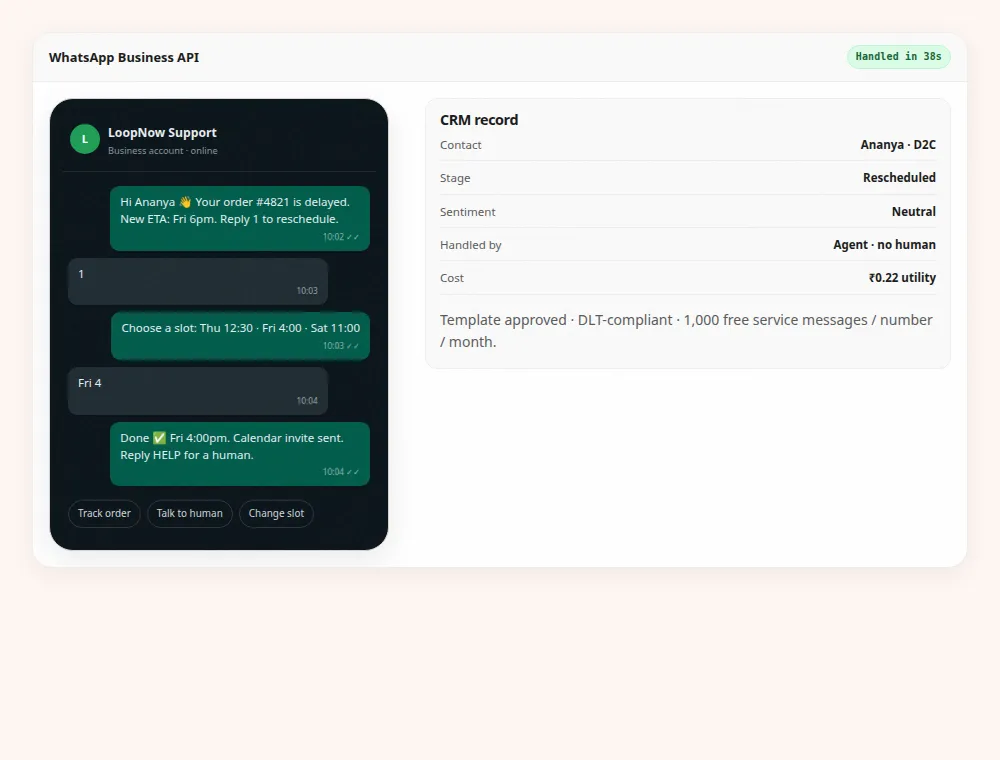
Keep the old templates visible for reference until the new ones are approved, and do not cancel the old business account early. If the number itself moves between providers, the migration has its own sequence and its own verification step, and the notes we work from are explicit that you should not cancel the old provider before the new number is verified. Test with a seed list of internal numbers before any customer sees a new sender name.
GST, two invoices and the month you switch
Zoho already bills in INR with GST, so this part of the move is less dramatic than it is for a team leaving a USD vendor. It is still worth planning, because a mid-cycle switch produces two invoices in one month, and finance teams dislike surprises more than they dislike cost. Decide the switch date with your accountant, keep both invoices, and check that the GSTIN on the new account matches the one your input credit depends on.
LoopNow prices exclude 18% GST, with Starter at ₹2,999, Growth at ₹7,999 and Scale at ₹24,999 a month, and Enterprise from ₹75,000. Annual billing takes roughly 20% off the monthly figure. Records sit in AWS Mumbai in ap-south-1, which is a different answer from a global suite’s and worth putting in front of your DPO early, because procurement will ask. If you are moving mid-cycle, expect a part-month charge from the old vendor and a full or prorated charge from the new one, and reconcile the two against the budget line rather than against each other. They are different services for different periods.
The more interesting commercial question is what the plan includes. A Zoho team is used to contact tiers with a generous email allowance, and moving to a platform that also includes WhatsApp messages, voice minutes, AI tokens, agents and workflows changes the unit economics. Compare on the channels you will actually use in the next twelve months, not on the one you use today, because the point of the move is usually to add a channel without adding a vendor.
Ten days, then the read-only month
Days one and two are export, field mapping and the suppression merge, with the CRM sync behaviour confirmed before anything is imported. Days three to five are domain authentication, template rebuild and the first automation rule, tested against a seed list. Days six to eight are the second rule, WhatsApp template submission and the start of warm-up. Days nine and ten are the parallel run, the cutover and a rollback rehearsal. Warm-up and WhatsApp approval continue past day ten, which is why campaigns wait.
Parallel running here means something specific: the CRM stays live and the old campaigns stay paused, while the new rules run on a slice of new contacts only. Compare one metric per rule over the same seven-day window, and prefer clicks and replies over opens. Do not run the same welcome rule on both platforms, because a new contact who receives two welcomes is the most visible failure this migration can produce.
After cutover, keep the old account read-only for thirty days rather than seventy-two hours. Zoho teams usually have monthly reporting that runs through Campaigns, and closing the account before the month-end report means reconstructing numbers from memory. Read-only costs nothing, answers questions, and gives you time to export the reports you forgot. Then close deliberately: revoke keys, confirm the final invoice, and ask in writing what happens to the data.
Frequently asked questions
Do I have to move off Zoho CRM as well?
No, and most teams should not. Keep Zoho CRM as the system of record and move marketing execution, exactly as the migration notes describe. Replacing a CRM is a separate project with its own data model, integrations and training. If you do want to consolidate, run it as a second project after the campaigns move, not at the same time.
What actually exports from Zoho Campaigns?
Lists, custom fields, templates and automation rules, per the migration notes we work from. What does not come across is the relationship between them: which rule used which template, and which field a personalisation depended on. Capture that in the account with screenshots and a short written note per rule, because it is the part you will need during the rebuild.
Will my unsubscribe state survive?
It survives if you import it as suppression before the first send, which is a deliberate step rather than an automatic one. Collect unsubscribes, hard bounces, complaints, CRM do-not-contact flags and erasure requests into one list with a source and a timestamp, and apply it ahead of any contact import. Suppressed contacts are free and unlimited on LoopNow plans.
How do WhatsApp templates work after the move?
Every template needs approval before it can be sent, and approvals belong to the business account rather than travelling with your contact list. Expect days rather than hours, start with utility templates such as order and delivery updates, and keep the old account active until the new templates are approved. Verify current category rules and pricing in the vendor dashboard.
Do I need new DLT registration for SMS?
Usually not, because registration is tied to your entity and sender IDs rather than to the marketing tool. Verify the status on the operator portal, then make sure your rebuilt messages match the approved template content. A registered template sent without consent is still a violation, so keep the consent purpose attached to the number and exclude suppression before every send.
Will adding a marketing subdomain break Zoho Mail?
It should not, if you publish the new records on a subdomain and leave the root domain’s mail records alone. Add DMARC at a monitoring policy first, confirm alignment on a seed test, and only then move to enforcement. Changing the root domain’s records without a reason is the mistake that causes business email to fail.
Is the move worth it if Zoho is cheaper?
Sometimes it is not. Our own comparison says Zoho wins on entry price and on being one vendor inside Zoho One. The case for moving is WhatsApp, voice in Indian languages, workflow with human gates, GEO and a consent ledger, on one bill with GST invoices. If you do not need those, staying is a rational decision.
How long does the whole migration take?
Ten working days for a mid-sized account with a handful of rules, assuming the CRM stays and the domain is under your control. Warm-up adds a week or two before campaigns run at full volume, and WhatsApp approval runs on its own clock. A large account with dozens of rules is a month of part-time work, most of it review rather than building.
What should I check in the first week after cutover?
That the CRM sync still creates and updates the right records, that a new contact receives exactly one welcome, that the preference page writes to the new suppression list, that every template link resolves, and that the WhatsApp templates in use are the approved versions. Compare one metric per rule against the old baseline over a full seven days before drawing conclusions.