Start with the job, not the model.
Three packaged outcomes on the same runtime: pipeline, CRM hygiene and email that lands.
Campaigns + LoopSend
Drag-and-drop campaigns, AMP emails, automations and transactional SMTP on AWS Mumbai.
ExploreOutbound that books
ICP scoring, multi-channel sequences across email, WhatsApp, LinkedIn and voice, and CRM updates after every touch.
ExploreZero manual entry
Agents log calls, emails and WhatsApp, score leads, route deals and flag pipeline risk.
Explore
The short version
- LoopNow packages three outcomes on one runtime: AI SDR for pipeline, CRM automation for record hygiene, and email marketing for retention and revenue. The platform pages explain the machinery; this page explains the job each one takes over.
- A solution here means a workflow that runs end to end with a named owner, a human approval gate and a run trace. It does not mean a prompt library or a chatbot bolted onto a form.
- Start with the job that is already failing. A pipeline gap, a CRM nobody trusts and an email programme that lands in promotions are three different problems with three different first workflows.
- Everything sits on the same India layer: AWS Mumbai in ap-south-1, a DPDP consent ledger, DLT-registered SMS and voice where required, and GST invoices in INR with 18% tax added at checkout.
- Growth is ₹7,999 a month, or ₹6,399 on annual billing, before 18% GST. A spend cap is on by default, and overage is billed at the published rate and never above pay-as-you-go.
- If you already know the job, the fastest path is a 48-hour build of one workflow with your own data, not a demo with sample records.
Why the job comes before the model
Almost nobody wakes up wanting an orchestration layer. They wake up with a number that is wrong. Too few meetings on the calendar for the quarter, a customer relationship system where half the fields are stale, an email programme that once worked and now lands in the promotions tab. The model is never the thing that is broken in that sentence, and buying a model has never fixed any of it. What fixes it is a workflow with a trigger, a decision, an action and a record of what happened.
That is the difference between a demo and a deployment, and it is why this page is organised by job rather than by capability. The platform pages describe how agents, voice, WhatsApp, workflow, email and GEO are built. This page describes what a team actually hands over: the sequence of touches that fills a pipeline, the logging that keeps a CRM honest, the send that reaches an inbox. Each one has a beginning, an end, and a person who is accountable when it goes wrong.
The framing matters commercially as well. When a buyer starts with a job, the first conversation is about volume, handoff rules and exceptions, and the first workflow can go live in about 48 hours. When a buyer starts with a model, the first conversation is about benchmarks, and the project stalls at the pilot stage because nobody agreed what success would look like in rupees.
Three packaged outcomes on one runtime
LoopNow sells three solutions, and they share everything underneath. AI SDR covers the top of the funnel: finding accounts that look like the ones that close, sequencing touches across email, WhatsApp, LinkedIn and voice, and booking the meeting with a human present. CRM automation covers the middle: logging every touch, scoring and routing leads, and flagging deals that have gone quiet before the quarter ends. Email marketing covers the base: campaigns, lifecycle automations, AMP content and transactional mail over SMTP.
The reason to buy them together is not bundling for its own sake. It is that the three jobs read and write the same records. A reply to a cold email changes the lead score, which changes the routing rule, which changes what the welcome campaign sends. When those run on separate tools, somebody has to wire the sync and somebody has to fix it at eleven at night when a field maps wrong. On one runtime the contact, the consent record and the activity log are the same objects, so a suppression in email is a suppression everywhere.
The reason to buy them separately is equally real. Plenty of teams have a working CRM and a broken outbound motion, or a working outbound motion and a CRM that nobody updates. Each solution is priced inside the same plan, so starting with one does not mean buying a second platform later. The plan allowances are pooled across channels, which is the practical difference between one bill and five.
Job one: a pipeline that fills itself
Outbound fails in India for reasons that have little to do with copywriting. Lists are bought and burned, domains are new and unauthenticated, WhatsApp numbers are registered to the wrong entity, and the person who was supposed to follow up went on leave. An SDR agent does not solve any of that by being clever. It solves it by doing the same sequence every day, on every record, with the same rules about when to stop.
The flow starts with a signal rather than a list: a pricing page visit, a job posting for a role the product replaces, a funding announcement, a form fill, a reply to an older thread. Those signals score against an ideal customer profile that the sales team defines in writing, not one inferred from a black box. Accounts above the threshold enter a sequence, and the sequence is deliberately multi-channel because a single channel in India gets ignored within a week.
Email carries the first two touches, WhatsApp carries the nudge for people who have opted in, voice carries the attempt for accounts above a value threshold, and LinkedIn sits where the seat allows it. Every touch writes back to the record, and the sequence stops the moment a human replies, books, or asks not to be contacted. The booking itself goes to a real calendar with a real owner, because a meeting nobody attends is worse than no meeting at all.
Job two: a CRM that stays true
Ask a sales leader why forecasting is unreliable and the answer is usually not the forecast model. It is that the record is a work of fiction. Calls are logged a week late, a WhatsApp conversation lives on somebody’s phone, a deal moves to negotiation because the rep needs it to, and the next person to touch the account has no idea what was said. CRM automation is unglamorous work, and it is the highest-leverage thing most Indian sales teams can fix in a fortnight.
The agent sits between the channels and the system of record. Every call transcript, email thread, WhatsApp exchange and form submission is summarised into fields the CRM already has: last contact date, next step, objection raised, decision timeline, budget signal. It does not invent custom objects on day one, because a schema nobody asked for becomes a schema nobody maintains. Where a field is genuinely missing, the change goes through a review with the person who owns reporting.
Scoring and routing come next. A lead that matches three of five qualifying criteria is routed to a named rep within working hours, and a lead that matches none is nurtured instead of assigned. Deals with no inbound activity for a defined window are flagged in a weekly digest, not silently reassigned. The value is not that the agent is smarter than a good sales operations person. It is that the check runs on every record, every day, including the ones nobody remembered to open.
Job three: email that lands in Indian inboxes
Email in India is not one inbox. It is Gmail on a phone with a data cap, Outlook inside a bank, a corporate server that greylists aggressively, and a Yahoo account somebody has kept since 2009. Deliverability work starts before the first send: authenticated domains with SPF, DKIM and DMARC, a warmed sending pattern, a suppression list that is honoured across channels, and a plain-text alternative for the clients that strip everything else.
The email solution covers three jobs that usually live in three tools. Campaigns handle the monthly newsletter and the offer mailer, with templates in 14 Indian languages and AMP blocks for cart recovery and forms. Lifecycle automations handle the welcome series, the abandonment sequence and the win-back, triggered by behaviour rather than by a date. Transactional SMTP handles receipts, OTPs and statements, where the only acceptable outcome is arrival.
What ties them together is consent and reporting. A contact who unsubscribes from a campaign is suppressed for the transactional stream only where the law and the relationship allow, and the preference centre records which. Opens and clicks are directional at best in a world of image proxies and privacy relays, so the reporting that matters is revenue attributed to a send, replies, and the deliverability signals that arrive from the mailbox providers themselves.
Which job comes first
The honest answer is the one with a number attached and an owner who is embarrassed by it. If the quarter is short on meetings, start with SDR. If the quarter is fine but the forecast is a guess, start with CRM. If acquisition is working and retention is leaking, start with email. Choosing all three at once is how a rollout takes a quarter and delivers a slide deck.
There is a sequencing rule that saves most teams a month. Fix the record before you automate the outreach, because an SDR agent pointed at a dirty database will produce clean-looking sequences aimed at the wrong people. If the CRM is genuinely unusable, the first workflow is a logging and dedupe job, and it pays for itself before any outbound begins. If the CRM is fine, skip straight to pipeline.
The second rule is about data volume. Start with a segment large enough to measure and small enough to check by hand: a few hundred accounts, one sequence, two weeks. If the reply rate is fine but the meeting rate is not, the problem is the offer or the booking step, not the copy. If replies are poor and deliverability is fine, the targeting is wrong. That diagnosis is only possible when the scope is small enough for a human to audit every record.
Industry variants on the same three jobs
The three jobs repeat across industries, but the constraints do not. A real estate team is chasing site visits, so the sequence has to book a Saturday slot and confirm it twice, because a no-show costs a broker half a day. A healthcare provider is chasing show-ups, so the sequence must not contain clinical content, and the consent record has to distinguish appointment reminders from marketing. The workflow shape is similar; the guardrails are not.
D2C teams care about cart recovery and repeat purchase, which is where AMP email and WhatsApp utility templates earn their keep, and where cart-recovery outcomes depend on the list, the offer and the timing rather than on the channel alone. Fintech and BFSI teams care about collections, where the agent may remind, schedule and confirm but may not threaten, and where every call recording needs a consent line in the language of the call.
Legal, logistics and SaaS each add their own rule. A law firm cannot let an agent characterise a client’s position; a logistics team needs the driver conversation in the driver’s language; a SaaS team needs the trial-to-paid sequence to stop the moment a human salesperson engages. The packaging stays the same, and the deployment checklist changes. That is why the industry pages exist as separate documents rather than as a grid of logos.
The India layer under every solution
Four things make an Indian deployment different from a generic one, and none of them are optional. The first is the Digital Personal Data Protection Act, 2023. Consent has to be specific, informed, and given for a purpose, and withdrawal has to be as easy as giving it. On this platform that means a consent record per contact per purpose, with the wording, the channel, the timestamp and the version of the notice that was shown.
The second is telecom compliance. Commercial SMS and voice in India run through DLT registration, with registered headers and templates, and a consent scrub against the preference registry. A workflow that sends an SMS without that registration will be filtered, and the failure looks like a deliverability problem when it is actually a paperwork problem. WhatsApp is different: templates go through Meta review, and the categories determine what the message can say.
The third is tax. Every price on this site is in rupees and exclusive of 18% GST, and every payment produces a GSTIN invoice that a finance team can book. UPI, netbanking, cards and NEFT for annual plans are all supported, because a procurement team that cannot pay by NEFT is a procurement team that will delay the renewal. The fourth is residency: managed workloads and managed model calls run in AWS Mumbai, ap-south-1.
What it costs, and how the arithmetic works
There are five plans. Free is ₹0 with 1,000 marketing contacts, 5,000 emails, 100 voice minutes, 250 WhatsApp messages, 250K AI tokens, one agent, one workflow and two seats. Starter is ₹2,999 a month, or ₹2,399 on annual billing. Growth is ₹7,999, or ₹6,399 annual, and is the plan most teams land on: 25,000 contacts, 1,00,000 emails, 5,000 WhatsApp messages, 1,500 voice minutes, 5M AI tokens, 10 agents, 10 workflows and 15 seats. Scale is ₹24,999 a month with 30 agents and 40 seats. Enterprise starts at ₹75,000 a month.
All of those numbers are exclusive of 18% GST. Annual billing saves 20%, about two and a half months free, and the price is locked for twelve months with a prorated refund inside the first thirty days. Overage is where most pricing pages get slippery, so the rates are published: ₹2.20 per connected voice minute, ₹0.03 per delivered email, ₹1.15 per WhatsApp marketing message, ₹0.22 per utility or authentication message, ₹0.30 per thousand AI tokens on the mid-tier model, and ₹0.35 per email verified.
Two rules protect the buyer. The first is that overage never exceeds the pay-as-you-go rate for the same meter, so a plan can only be cheaper than staying unplanned. The second is the spend cap, which is on by default. When the cap is reached the account can either auto-top-up or hard stop, and the hard stop is a real stop rather than a warning email nobody reads. A finance team that has been burned by a surprise invoice tends to test this in the first week, which is exactly the right instinct.
What the first month looks like
Week one is unglamorous and decides the rest. The team picks one workflow, connects the system of record, loads a cohort of real records, and writes down what success means in a number that can be checked on a Friday. That is usually a reply rate, a booked-meeting count or a percentage of records with a logged next step. It is never a satisfaction score, because nobody has an opinion worth measuring in week one.
Week two is the build and the first live traffic, usually on one channel. The approval gates are set: anything that quotes a price, promises a delivery date or discusses a regulated product goes to a human. Week three is the uncomfortable one, because the first data arrives and contradicts somebody’s assumption about the audience. The most common finding is that the best-performing segment is not the one the team expected, and the workflow gets narrower rather than wider.
Week four is the decision point. If the number moved, the next workflow is scoped. If it did not, the plugin is turned off, which is cheaper than keeping a half-working automation running and calling it a pilot. Typical go-live for one workflow is about 48 hours once templates and access are ready, so the month is mostly spent on policy, data and review rather than on engineering. Teams that expect a four-week build are usually surprised in the good direction; teams that expect a same-day switch are usually surprised in the other one.
Where a solution stops
An agent is good at volume, consistency and memory. It is bad at judgement, novelty and anything where being wrong is expensive and irreversible. That boundary is designed into every deployment rather than left to the model to infer. Pricing exceptions, contract terms, medical advice, legal opinion, credit decisions and anything that touches a regulator go to a named human, with the context assembled and the decision recorded.
The second limit is data quality. An agent reading a CRM where the same customer exists four times will produce four coherent but conflicting views. The deduplication pass is part of the deployment, not an optional extra, and it is the step clients most often want to skip. Skipping it does not fail immediately; it fails at the first board review, when two dashboards disagree and nobody can say which one is right.
The third limit is cultural. A workflow that a sales team does not trust will be worked around within a fortnight, usually by logging activity in a personal notebook. The remedy is not more automation but visible evidence: a weekly digest that shows what the agent did, what it got wrong and what it escalated. Teams adopt the system that makes their own work easier to defend, and no amount of model quality substitutes for that.
How to start without a procurement cycle
The free plan exists so that the first question is answered with data rather than with a slide. It includes 1,000 contacts, 5,000 emails, 100 voice minutes and 250 WhatsApp messages, one agent and one workflow, with two seats and no card. That is enough to run a real sequence against a real segment and see whether replies arrive. It is not enough to run a quarter, and it is not meant to be.
From there, the path is a working session rather than a demo. Bring a segment, a template, a calendar and the person who owns the number. In ninety minutes the workflow can be sketched, the escalation rules agreed and the data questions listed. Most of the objections that surface in a demo, such as where the data sits and who sees the transcript, are answered by configuration in that session rather than by a document.
If the answer is that none of the three jobs is the priority this quarter, the right move is to wait. The platform will still be here, the pricing is published, and a deployment that starts without an owner and a number is a deployment that ends in a renewal conversation nobody wants to have. The solutions are deliberately narrow for that reason: narrow enough to finish, and useful enough to extend once the first number moves.
Frequently asked questions
Do I have to buy all three solutions?
No. Each solution runs inside the same plan allowances, so starting with SDR does not commit you to email or CRM automation. Most teams start with one job, measure it for a month, and add the second only when the first has an owner and a number that moved. The shared runtime means the second deployment reuses the same contacts, consent records and activity log rather than starting from an empty workspace.
Which solution should a ten-person team start with?
Usually the one with the most manual work behind it. If a founder is still sending every follow-up, start with SDR. If two people spend Friday afternoon updating a CRM, start with CRM automation. If the list is small and the revenue comes from repeat purchase, start with email. The decision tree on this page is the same one used in a scoping call, and it takes about ten minutes to work through.
Is this a replacement for my CRM or my email tool?
No. CRM automation writes into Salesforce, HubSpot, Zoho or Freshsales rather than replacing them, because the system of record is where finance and leadership already look. Email can replace a campaign tool, and the SMTP relay can replace a transactional provider, but plenty of teams keep both and use LoopNow for the segments that need Indian language templates and GST invoicing. Replacement is a choice, not a requirement.
How does DPDP consent work across three solutions?
Consent is stored per contact, per purpose, per channel, with the wording shown, the timestamp and the notice version. A withdrawal in email suppresses the contact everywhere the purpose no longer applies, and the record of the withdrawal is kept even after the data is deleted. That matters because the burden is on the business to prove consent, not on the customer to prove they refused.
What does a pipeline deployment cost in total?
Growth is ₹7,999 a month, or ₹6,399 on annual billing, and it covers 25,000 contacts, 1,00,000 emails, 5,000 WhatsApp messages, 1,500 voice minutes, 10 agents and 15 seats. Add 18% GST. A team sending 2,000 WhatsApp marketing messages, 20,000 emails and using 600 voice minutes stays inside the allowance, so the bill is the plan price and nothing else. Overage only starts beyond those limits.
How long before the first workflow is live?
About 48 hours for one workflow once access, templates and the escalation rules are agreed. The variable is not the build; it is DLT registration for SMS and voice, Meta review for WhatsApp templates, and the internal sign-off on consent wording. Teams that prepare those three items in parallel with the build usually go live inside a week. Teams that treat them as paperwork after the build usually take three.
Can the agent talk to customers in Indian languages?
Yes, across 14 Indian languages for voice and chat, including code-mixed Hinglish, which is how most Indian customers actually speak. The agent switches language when the customer does, and the transcript records which language each turn used. Templates for email and WhatsApp exist in the same 14 languages. Regional nuance still needs review by a native speaker before a regulated deployment goes live.
What happens when the agent gets something wrong?
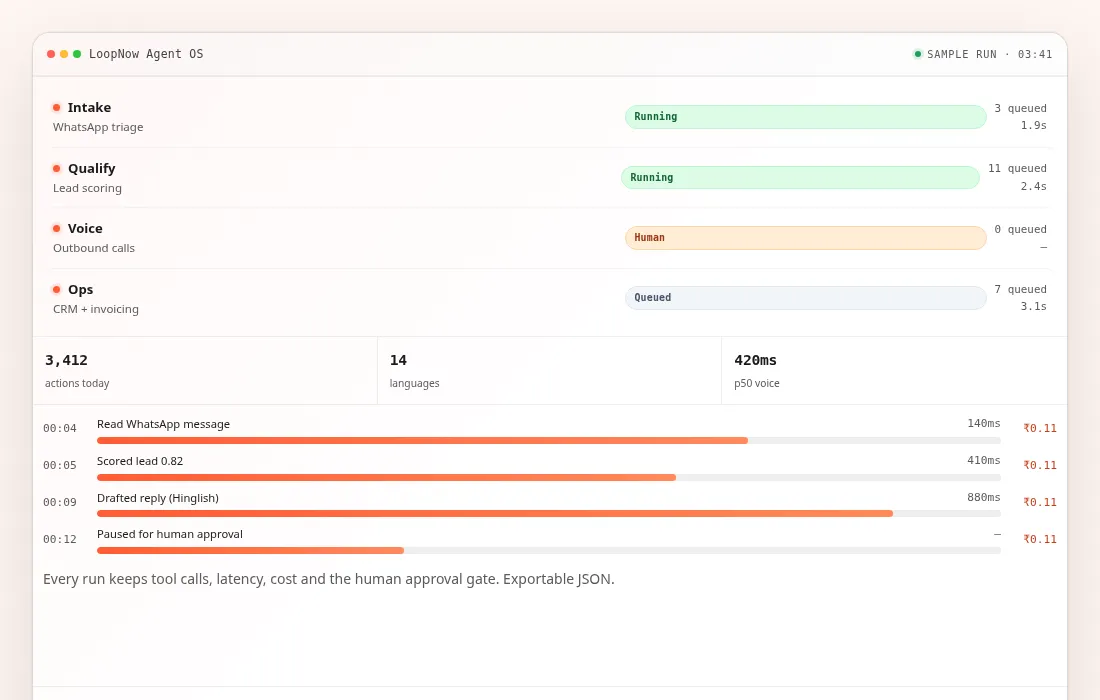
Every run is traced: the input, each tool call, the latency, the cost and any approval gate. When a customer receives a wrong answer, support can replay the run and see whether the fault was the prompt, the data, the tool or the model. Corrections are made to the workflow rather than to a single conversation, and the evaluation set grows by one case each time. That is slower than patching a reply and far more durable.
Do you offer a pilot price?
The free plan is the pilot for most teams: 1,000 contacts, 5,000 emails, 100 voice minutes and 250 WhatsApp messages, with one agent and one workflow, no card required. A paid pilot is possible on Starter at ₹2,999 a month, excluding 18% GST. We do not publish a separate pilot rate, and we do not discount a plan to win a test, because the allowances are the same ones a paying customer gets.